
How to send wedding invitations on WhatsApp
5 min read
For most guests, WhatsApp is where an invitation actually gets read. An email waits in a promotions tab; a message on the phone is opened the same evening. Sending it well comes down to one decision, a group or one guest at a time, and a little care with the words around the link.
A group, or one chat per guest
A WhatsApp group is quick: one message and everyone has it. It is also where replies go to die. Thirty people answer "yes!" and "can't wait" in a stream nobody can count, every guest sees who else was invited, and the cousin who needs a nudge is lost under the stickers.
One chat per guest takes longer and works better. Each guest hears from you, personally, and can ask a question without an audience. If you do use a group, send a link that collects the replies on a page of its own, so the chat is left for the congratulations and the counting happens somewhere else.
What to write with the link
Keep it short and in your own voice: a line about the news, the date, and the link. "We're getting married! Saturday 12 June, in Paphos. Everything is here, and you can reply in a minute:" and then the link.
Put the reply deadline in the message if you have one. People act on what is in front of them, and a date in the chat is easier to act on than a date three screens into a website.
Leave the logistics out. A chat shows the first lines and a small preview of the link; the invitation behind it is where the schedule, the map and the dress code belong. Send the message to yourself first, and read it as a guest would.
Keep track with a guest list, not from memory
The hard part of sending one by one is knowing where you are: who has it, who has opened it, who has answered. A spreadsheet can do it. A guest list that keeps track for you does it better.
In MyEventOS, each guest on your list gets a link of their own. Tap WhatsApp beside a name and WhatsApp opens with your message and their link already written in: you only press send. Their invitation opens with their name filled in, and your list marks them with one grey tick when it is sent, two blue ticks when it is opened, and two green ticks when they have replied.
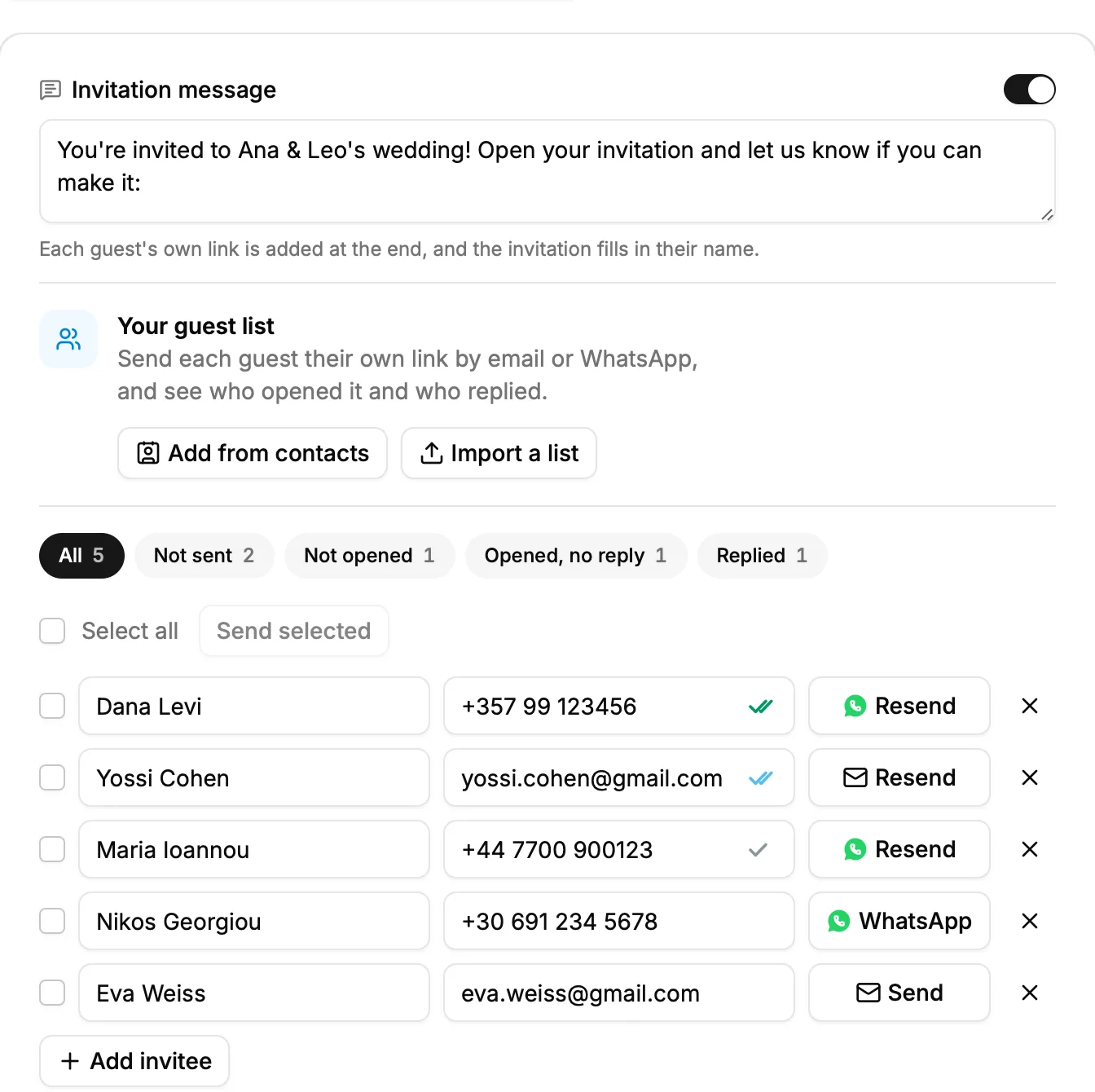
With many guests, tick them and send them together. The emails go at once, and the WhatsApp chats open one after another, a tap for each.
When to send, and how to remind
Send in the evening or at the weekend, when people have a minute to open it and answer on the spot. A message read in the rush before work is filed away in the head and forgotten.
A week before your reply deadline, look at who has opened the invitation and not answered. Those are the people to write to, one at a time, with a short note and the same link. Nobody minds a friendly reminder; everybody minds one sent to the whole group.

Guests who are not on WhatsApp
Some guests, often the eldest, would rather have an email or a card. Send them the same invitation by email, or print its link as a QR code on a card. Every reply lands in the same list, whichever way it came.
Collect the answers while you are at it
MyEventOS turns the invitation, the RSVP and the guest list into one link, and counts the replies as they land. Free to design, free to send, and the first ten replies are included.
Start creating free